Running a campaign
launch, play, retain.
From an empty campaign to a live Mini App: the launch checklist, branding, token, economy, quests (including sponsored), daily puzzles, seasons with a cosmetic pass, live events, squads, the Stars shop and rewarded ads with the Adsgram Reward URL.
01Launch checklist (the launch wizard)
Every campaign has Settings → Launch: seven steps from an empty campaign to a live Mini App. Grey steps use defaults that are fine to launch with.
| # | Step | Required | Done when |
|---|---|---|---|
| 1 | Connect the Telegram bot | yes | Token validated (owner only). See Telegram bot. |
| 2 | Set the Mini App URL (+ welcome message) | yes | URL saved. https, or localhost for testing. |
| 3 | Brand the Mini App | optional | Theme differs from the default. |
| 4 | Describe the token | yes | Token name and symbol set. |
| 5 | Tune the economy | optional | Defaults are fine to launch with. |
| 6 | Add quests | optional | At least one quest. |
| 7 | Go live | yes | Status is no longer draft. The button stays disabled until steps 1, 2 and 4 are done. |
| Status | What players see |
|---|---|
| draft | The game already works so you can test with your own account. |
| live | Players can play. Set by Go live. |
| paused | Campaign shown as paused; no earning. Balances are kept. Resume campaign sets it live again. |
| snapshot / claim | Set automatically by the airdrop flow (publish → snapshot, distributor recorded → claim). Earning stops. |
02Branding and token
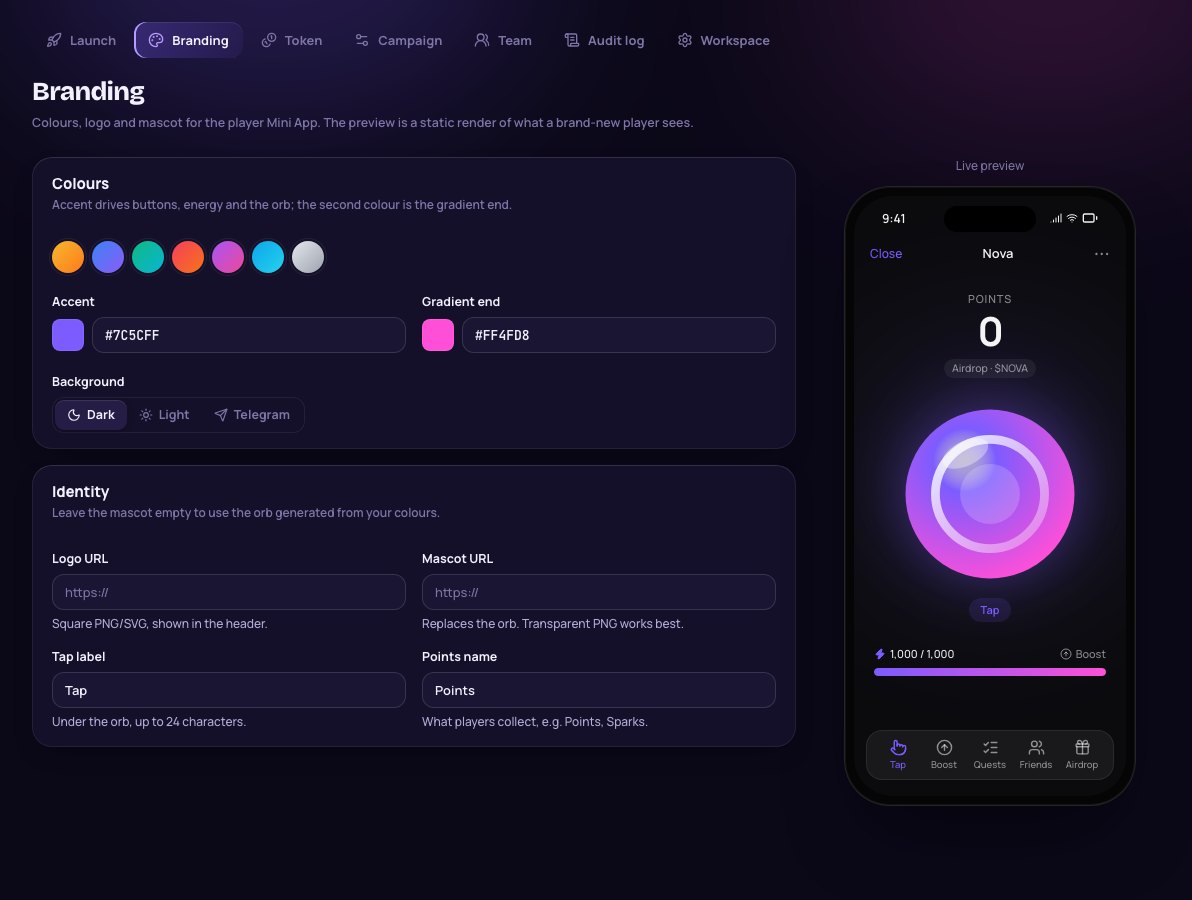
Branding (Settings → Branding): accent colour and gradient end (buttons, energy bar and the generated orb; seven presets), background (dark, light or telegram, which follows the player's Telegram theme), logo URL, mascot URL (replaces the orb; transparent PNG works best), tap label (up to 24 characters), points name (up to 16 characters, e.g. "Sparks"), Story image URL (a 1080×1920 image for "Share to Story"; empty hides Story sharing) and Emoji status id (digits of a custom emoji players can set as their Telegram status; empty hides it). Image URLs must be https. A phone preview shows what a brand-new player sees.
Token (Settings → Token): name, symbol, decimals (0–18, default 9, must match the jetton's metadata), description shown on the Airdrop tab (keep it factual, no promises of value), website and Telegram channel URL, and the jetton master address (TEP-74). The jetton master is only needed when you prepare the airdrop.
03Economy
Every number the game runs on. The server enforces these values; the Mini App only displays them. Players have a spendable balance (for upgrades) and lifetime points (never decrease). The airdrop uses lifetime points only.
| Setting | Default | Meaning |
|---|---|---|
| Points per tap | 1 | Each tap gives this many points and costs this much energy. |
| Max energy | 1000 | Energy tank (minimum 10). |
| Energy regen | 1 /sec | Energy refilled per second. |
| Passive points | 0 /hour | Base farming rate before upgrades. |
| Tap rate cap | 15 /sec | 1–30. Taps above this are dropped by the server. |
| Farm cap | 3 hours | 1–24. Offline farming stops after this until the player opens the app. |
| Daily streak | 500, 1000, 2000, 3500, 5000, 7500, 10000 | Reward per consecutive UTC day (1–30 days). Missing a day restarts at day 1 unless a streak saver covers it; after the last day the table repeats. |
Referrals, two tiers only. Activation threshold 1,000 lifetime points; activation bonus 2,500 to the direct inviter; +5,000 when the invitee has Telegram Premium; tier-1 share 10% (max 50%) and tier-2 share 2.5% (max 25%) of the invitee's tap and farm points, paid on top (not deducted from the invitee). Invite links look like https://t.me/<bot>?start=ref_<telegramId>. Self-invites and unknown inviters are ignored.
Upgrade cards (up to 60) are bought with points only. Each raises one stat per level; cost of the next level = round(base × growthlevel). Defaults: Multitap, Battery, Recharge, Miner, Rig (needs Miner 3), Datacenter (needs Rig 5). Do not rename a card's key once players have bought levels.
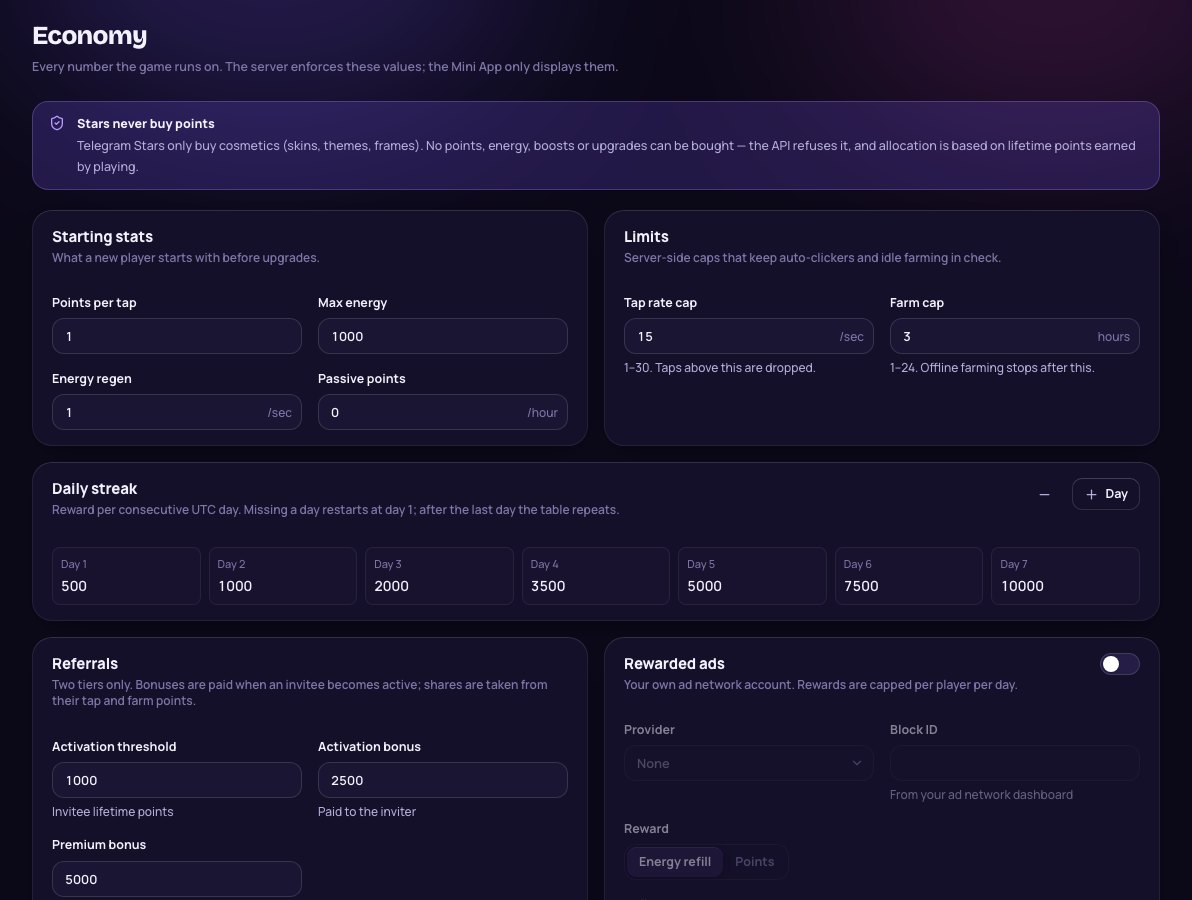
The Economy page repeats the rule: Stars buy cosmetics only. No points, energy, boosts or upgrades can be bought; the API refuses it.
04Quests (including sponsored)
One-off tasks that reward points. The order in the admin is the order players see. Deactivate a quest instead of deleting it; points already granted stay.
| Type | Settings | Completes when | Verified? |
|---|---|---|---|
| Join channel | @channel or numeric chat id, optional invite link for private channels | Telegram says the player is a member | Verified (bot must be channel admin) |
| Visit link | URL, minimum time (default 10 s) | Player opens the link and taps verify after the minimum time | Self-reported (labelled) |
| Invite friends | Activated invites needed | Player has that many activated tier-1 referrals | Verified |
| Connect wallet | – | Player linked a TON wallet with a valid proof | Verified |
| Daily check-in | – | Once per UTC day | Verified |
Sponsored quests are quests you sell to another project. In the quest editor pick a Sponsor (create it on the Sponsors page first), a price per completion (CPA), an optional budget (empty = no cap) and optional start/end dates (UTC). The Mini App labels them "Sponsored". A budgeted quest disappears from the player list once completions ≥ floor(budget ÷ price); a late verify returns quest_unavailable. Sell channel joins as verified results and link quests as clicks, never as results. See Sponsors.
05Daily puzzles
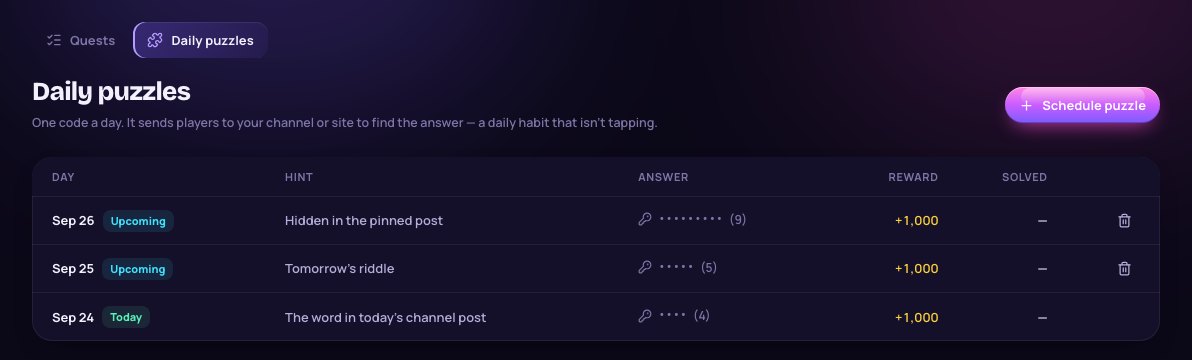
Quests → Daily puzzles: one code a day that players crack from a hint, for example a word hidden in your channel post of the day. Fields: day (UTC, today or later), hint, answer, reward. The answer is stored only as a salted hash and never shown again (the list shows its length). Case and spaces don't matter; each player has 5 attempts per puzzle. Only future puzzles can be removed. Without a puzzle, players see "next puzzle soon".
Streak savers (free, never sold): every 7th consecutive day grants one saver (max 3). A missed day is covered automatically by one saver instead of resetting the streak.
06Seasons and the cosmetic season pass
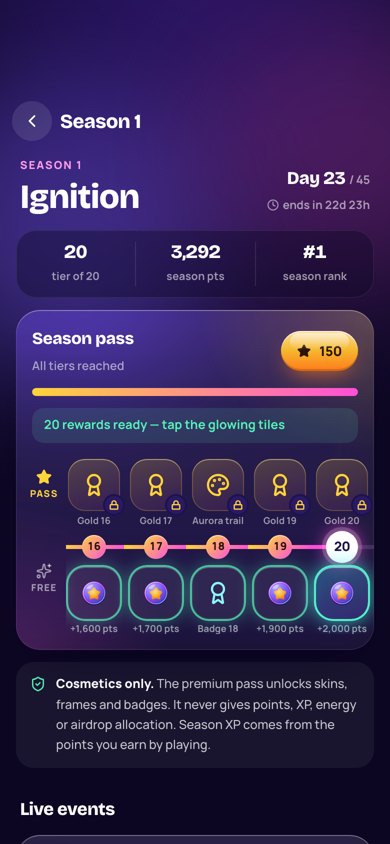
Seasons → New season: name (shown in the Mini App), start (UTC), length, pass tiers, points per XP (season XP = points earned ÷ this) and the premium pass price in Stars (0 = free track only). Seasons may not overlap. A season resets the season leaderboard and pass progress; lifetime points and airdrop eligibility are not reset.
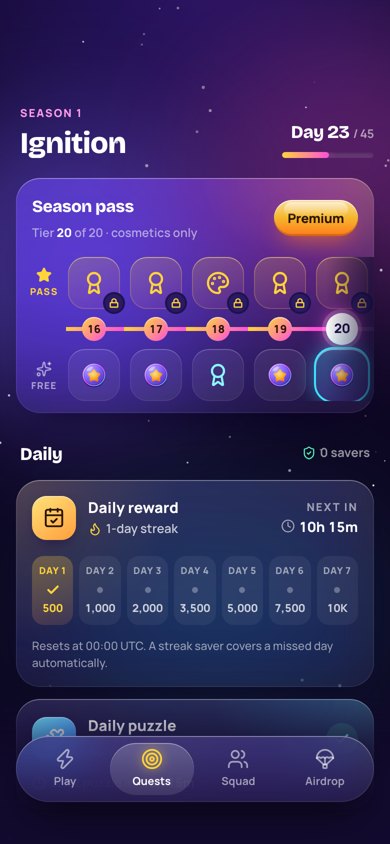
Open builder edits a season with a live phone preview: basics, a generated XP curve ("Generate tiers"), and per tier a free reward (points or a badge) and a premium reward (a cosmetic from this campaign's shop, or a badge). Changes stay a draft until Publish changes. Test in Telegram / Scan to test open your bot on your phone. Once a season has started, its start date and points-per-XP are fixed; a season with player progress cannot be deleted.
The premium track unlocks cosmetics and badges only, never points, XP, energy or allocation. The pass is a one-time Stars payment per season (not a subscription); a second charge for a pass the player already owns is refunded automatically. Premium claims never touch the point ledger.
07Live events
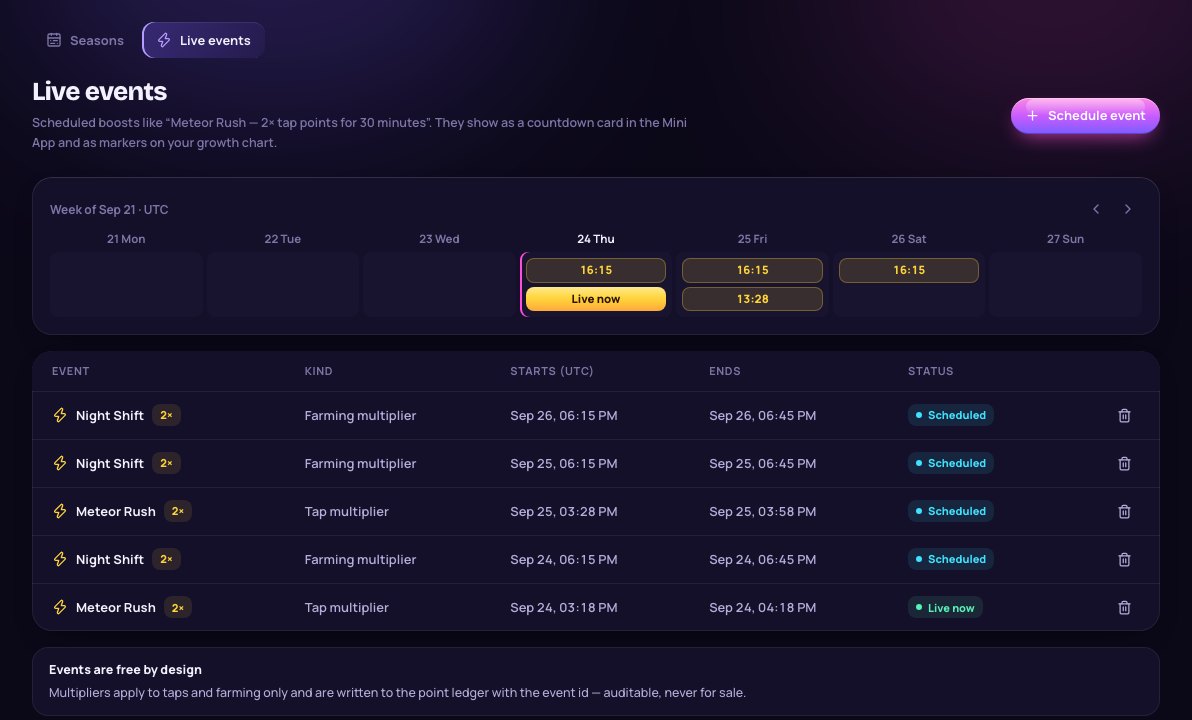
Seasons → Live events: free, time-boxed boosts for everyone, never sold, like "Meteor Rush: 2× tap points for 30 minutes". Kinds: Tap multiplier, Farming multiplier (applied server-side to taps or farming only) and Quest bonus (display only). The admin offers 1.5×, 2×, 3× and 5×. Events of the same kind cannot overlap; the highest active multiplier applies, never stacked. Repeat daily creates the same event for up to 30 days; Push when it starts schedules a bot broadcast to all players with a "Play now" button.
Multiplied points are written to the point ledger with the event id, so every boost is auditable. Events show as a countdown card in the Mini App and as markers on the Overview growth chart. A running event can only be ended early; only future events can be removed.
08Squads
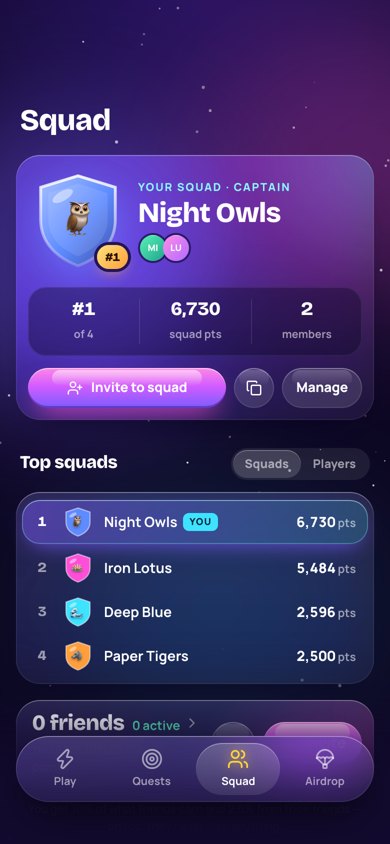
Players create and join squads from the Squad tab: one squad per player, at most 100 members, open or invite-only (join by code or invite link https://t.me/<bot>?startapp=s_<code>, which needs the Main Mini App set in BotFather). Squad points are what members earn while in the squad during the active season. When the owner leaves, the longest-standing member becomes owner; the last member leaving disbands the squad.
Admin → Squads lists squads by season points, members, newest or name. Disband (for offensive names or abuse) removes members from the squad; their own points are untouched. It is logged.
09Achievements
Twelve built-in achievements with a points reward each: First tap (100), 10,000 taps (1,000), 7-day streak (1,500), 30-day streak (7,500), First friend (500), Recruiter, 10 friends (5,000), Squad up (500), Wallet ready (500), Puzzle master (2,500), Season veteran, pass tier 10 (2,000), Quest hunter (1,500), Maxed out (3,000). They are defined in packages/shared/src/v2.ts; change the list there if you customise the game.
10Shop: cosmetics for Telegram Stars
Shop → New item: orb skins (recolour the orb or replace it with your image), app themes (background + accent) and orb frames. Price 1–100,000 Stars. Items with purchases are hidden instead of deleted; owners keep them. Settings → Purchases lists payments; an owner can Refund one: Telegram returns the Stars and the item is removed.
If money could buy points, energy, boosts or upgrades, the airdrop would reward spending instead of playing, and a paid entry into a token distribution raises legal and platform-policy problems. The API has no code path that grants points, energy or upgrades for Stars.
11Rewarded ads and the Adsgram Reward URL
Economy → Rewarded ads, with your own Adsgram account: enable, provider Adsgram (Monetag is listed as "not supported yet"), Block ID (digits, or int- followed by digits, from your Adsgram dashboard), reward (energy refill or points; default 500 points), a daily cap per player (0–50, default 5), and optionally Your eCPM in $ per 1000 impressions from your ad dashboard, used only for the labelled estimate on the Revenue page. The server requires at least 10 seconds between an ad start and its completion. In the Mini App the ad button shows on the Play tab when ads are on; with the energy reward only while energy is below half.
Server confirmation (recommended)
- Make the API public
PUBLIC_API_URLmust be your https API. Adsgram only calls https Reward URLs on port 443. - Generate the Reward URLEconomy → Adsgram server confirmation → Generate (manager or owner). It looks like
https://api.example.com/api/ads/adsgram/<slug>/reward?userid=[userId]&token=…. The secret is shown once; only its SHA-256 hash is stored. - Paste it into AdsgramPut the URL in your ad block's Reward URL setting. Keep
[userId]exactly as written: Adsgram replaces it with the player's Telegram ID. - Require itSwitch on Require server confirmation and save. From then on only Adsgram's callback grants the reward; the Mini App waits for it and picks up a late confirmation on the next sync.
Regenerate creates a new URL and the old one stops working immediately. Revoke disables the callback; with server confirmation on, ads are refused until you generate a URL again. The API refuses to require server confirmation without a configured Reward URL (ads_not_configured). Wrong secrets are rate-limited, and each callback confirms at most one pending ad view of that player.
The callback is covered by automated tests against Adsgram's published Reward URL format. Test it with your own block before you rely on it.
12Players, bans and team roles
Players lists everyone who opened the Mini App (50 per page) with search, sort (highest balance, most lifetime points, recently active, newest) and filters. Usernames, Telegram IDs and wallets are redacted by the API itself; Reveal (logged) shows one player's details and records who looked, when and why. Ban player hides them from the leaderboard and future snapshots; they can still open the app and see a restricted screen.
| Role | Can |
|---|---|
| owner | Everything, including bot tokens, Stars refunds, fairness multipliers and re-verification requirement, revenue entries, report links with the revenue section, publishing snapshots, deploying/funding/withdrawing the distributor, deleting clients, and the team. The last active owner cannot be demoted or removed. |
| manager | Campaign content (branding, token, economy, quests, shop, seasons, events, puzzles, sponsors, links, clients, broadcasts, rules, appeals, report links without revenue, clone), players (ban, reveal), anti-bot recompute and overrides, snapshot drafts and CSV export, audit log. |
| viewer | Read-only. |
Team members see every campaign of the installation. If clients must not see each other's campaigns, give them report links (read-only) instead of admin accounts, or run a separate installation per client.